Styling Text
Overview
WIP. Font fallback and the text shaper are stable; some advanced typography (font-feature-settings, variable axes) is not yet wired through from CSS to the layout engine. The properties below all parse and apply.
Text rendering is driven by four font properties (font-family,
font-size, font-weight, font-style) and modulated by alignment,
justification, and line metrics.
font-family
StyleFontFamily is one of:
System(name). CSS like"Arial"orTimes New Roman. Resolves to a face matching the family name.SystemType(SystemFontType). CSS likesystem:uiorsystem:monospace:bold. Resolves to a platform UI font.File(url). CSS likeurl(/fonts/Inter.ttf). Resolves to a font file loaded from the URL.Ref(FontRef). Not addressable from CSS. Resolves to a pre-loaded font handle.
The property takes a comma-separated fallback list. Each entry is tried in order; the first one that resolves to a face containing the requested glyph wins.
body { font-family: "Inter", system:ui, sans-serif; }
code { font-family: system:monospace, "SF Mono", Menlo, monospace; }
system: fonts
The system:<role>[:<variant>] prefix selects a platform UI font without
hard-coding a family name. It resolves to the OS's preferred face for
that role:
system:ui. The default UI font.system:ui:bold. The UI bold variant.system:monospace,system:monospace:bold,system:monospace:italic. Platform monospace.system:title,system:title:bold. Larger UI text.system:menu. Menu and menu-item label font.system:small. Small-print UI font.system:serif,system:serif:bold. Platform serif.
If the role isn't recognised, the parser keeps the literal string as a
System family (so system:invalid becomes the family named
"system:invalid").
FontRef and pre-loaded fonts
FontRef is a reference-counted handle that points at parsed font data.
You won't construct FontRef from CSS, but you'll see it on the Rust side
when binding a font once and using it across multiple DOMs.
font-size
StyleFontSize wraps a PixelValue. The default is 12pt. Pick whatever
your design system needs:
h1 { font-size: 28px; }
p  { font-size: 1em; }
small { font-size: 80%; }
em is relative to the parent's font-size. rem is relative to the
root. % resolves the same way as em.
font-weight
StyleFontWeight:
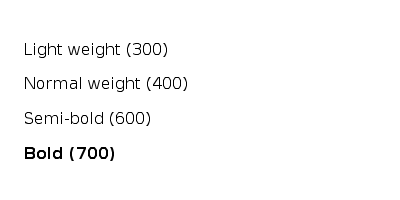
lighter. Lighter than parent.100...300. Maps toW100...W300.normal,400. Maps toNormal.500,600. Maps toW500,W600.bold,700. Maps toBold.800,900. Maps toW800,W900.bolder. Heavier than parent.
The numeric scale is the OpenType weight class. The parser maps standard
numbers to enum variants. 450 and other in-between numbers are not
accepted; use the named variant for the closest weight.
font-style
StyleFontStyle:
StyleFontStyle::Normal   // upright (default)
StyleFontStyle::Italic   // italic face
StyleFontStyle::Oblique  // oblique (synthesised slant if no italic face)
text-align
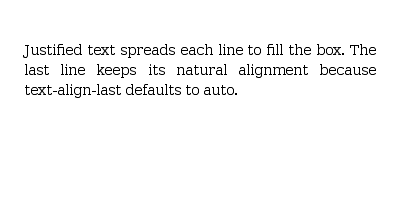
Horizontal alignment of inline content within its line box:
start(default). Left in LTR, right in RTL.end. Right in LTR, left in RTL.left/right. Absolute, ignoring text direction.center. Centred.justify. Spread to fill the line. Seetext-justifybelow.
text-justify
LayoutTextJustify refines what text-align: justify does:
auto(default). UA picks the appropriate algorithm for the script.none. No justification (text-align: justifyis treated asstart).inter-word. Distributes whitespace only between words.inter-character. Distributes whitespace between every character (CJK-friendly).distribute. Legacy alias ofinter-character.
The legacy distribute value computes to inter-character per the spec.
Line metrics
line-heightaccepts<percentage>. Default120%. Multiplier applied tofont-size.letter-spacingaccepts<length>. Default0px. Added between every glyph.word-spacingaccepts<length>. Default0px. Added between words.tab-sizeaccepts<length>. Default8em. Width of a tab character.
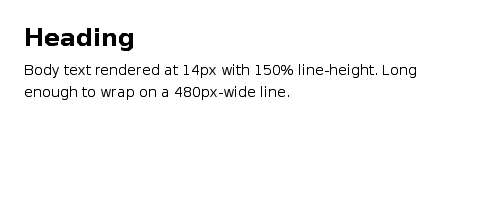
.body { line-height: 150%; letter-spacing: 0.02em; }
pre   { tab-size: 4em; }
Wrapping and breaks
white-space controls collapsing and wrapping:
normal(default). Collapses whitespace and wraps.pre. Preserves whitespace. No wrap (only at explicit breaks).nowrap. Collapses whitespace. No wrap.pre-wrap. Preserves whitespace and wraps.pre-line. Collapses whitespace but preserves newlines. Wraps.break-spaces. Preserves whitespace and breaks at every space. Wraps.
word-break and overflow-wrap decide what to do with long unbreakable
sequences (URLs, code, CJK):
StyleWordBreak::Normal      // default
StyleWordBreak::BreakAll    // allow break between any two characters
StyleWordBreak::KeepAll     // forbid break inside CJK
StyleWordBreak::BreakWord   // deprecated alias

StyleOverflowWrap::Normal   // only at allowed break points
StyleOverflowWrap::Anywhere // break anywhere to prevent overflow
StyleOverflowWrap::BreakWord
hyphens: none | manual | auto enables soft-hyphen breaking. auto
requires the layout crate's hyphenation resources for the active language.
Direction and writing mode
For bidirectional text:
StyleDirection::Ltr   // left-to-right (default)
StyleDirection::Rtl   // right-to-left

StyleUnicodeBidi      // bidi-override embedding for the inline element
For vertical scripts, set writing-mode on the block container. See
Inline and Text Flow
for the values.
Text decoration and selection
text-decorationacceptsnone,underline,overline, orline-through.user-selectacceptsauto,text,none, orall.vertical-alignacceptsbaseline,top,middle,bottom,sub,super,text-top,text-bottom,<percentage>, or<length>.
user-select: none is what you want on buttons and icon glyphs to prevent
double-click text selection from overlapping the click.
Recipes
Heading and body
Justified paragraph
Mixed weights
Default values at a glance
font-family. Defaultserif(platform default).font-size. Default12pt.font-weight. Defaultnormal(400).font-style. Defaultnormal.line-height. Default120%.letter-spacing. Default0px.word-spacing. Default0px.tab-size. Default8em.text-align. Defaultstart.text-justify. Defaultauto.white-space. Defaultnormal.word-break. Defaultnormal.overflow-wrap. Defaultnormal.hyphens. Defaultmanual.direction. Defaultltr.text-decoration. Defaultnone.user-select. Defaultauto.vertical-align. Defaultbaseline.