CSS Properties
Overview
The properties azul recognises, grouped by what they style. Each entry lists the syntax and the Rust type the parser produces.
Value primitives
- Length (px/em/rem/...) accepts
12px,1.5em, or100%. TypePixelValue. - Length (no percent) accepts
4pxor2em. TypePixelValueNoPercent. - Percentage accepts
50%. TypePercentageValue. - Angle accepts
90deg,0.5turn,1.57rad, or100grad. TypeAngleValue. - Time accepts
200ms,0.3s, or5t. TypeCssDuration.tis a tick (one frame at the nominal 60Hz rate): it expresses a duration without assuming a real clock, socaret-animation-duration: 5tflips on exactly the 5th frame on any machine.trather thanfr, becausefris CSS grid's flex unit. - Color accepts
#fff,#1a2b3c,rgb(...),rgba(...),hsl(...),hsla(...), named colors, andcurrentcolor. TypeColorU. - System color accepts
system:accent,system:text,system:background, and so on. TypeColorOrSystem. - System font accepts
system:ui,system:monospace,system:title, and so on. TypeStyleFontFamily::SystemType. - Float accepts
1.5or0. TypeFloatValue.
Length units: px, em, rem, pt, pc, cm, mm, in, vw, vh,
vmin, vmax, %, ex, ch. Angle units: deg, rad, grad,
turn, %.
Bare 0 is accepted for any length without a unit. Bare numbers without
a unit are interpreted as degrees for angle properties.
CSS-wide keywords
Every property accepts auto, none, initial, inherit, unset, and
revert in addition to its typed value (CssPropertyValue<T>). Some
properties only accept a subset (border-style ignores auto,
font-family rejects initial, etc.) but the parser is permissive and
the cascade handles the rest.
Box model
width,height,min-width,min-height,max-width,max-heightaccept a length,auto,min-content,max-content, orfit-content. TypesLayoutWidth,LayoutHeight, and so on.padding,padding-top,padding-right,padding-bottom,padding-leftaccept a length. TypeLayoutPadding*.margin,margin-top,margin-right,margin-bottom,margin-leftaccept a length orauto. TypeLayoutMargin*.box-sizingacceptscontent-boxorborder-box. TypeLayoutBoxSizing.displayacceptsblock,inline,inline-block,flex,inline-flex,grid,inline-grid,none, orinherit. TypeLayoutDisplay.positionacceptsstatic,relative,absolute,fixed, orsticky. TypeLayoutPosition.top,right,bottom,leftaccept a length orauto. TypesLayoutTopand so on.overflow,overflow-x,overflow-yacceptvisible,hidden,scroll,auto, orclip. TypeLayoutOverflow.z-indexaccepts an integer. TypeLayoutZIndex.
width: auto and height: auto defer to the layout algorithm.
min-content, max-content, and fit-content derive from intrinsic
sizing.
Background
background is a shorthand for background-color and background-image.
Multiple comma-separated layers stack from front to back.
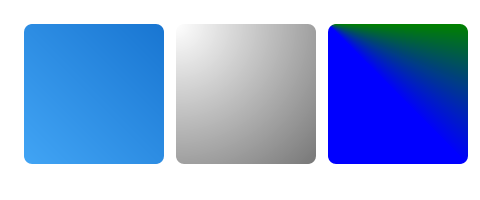
background: linear-gradient(to right, #1976d2, #42a5f5);
background: radial-gradient(circle at 30% 30%, #fff, #999);
background: conic-gradient(from 0deg, red, yellow, green, blue, red);
background: url('chrome.png'), #f0f0f0;
background(shorthand) accepts a color, gradient, image, or multiple layers. TypeStyleBackgroundContentVec.background-coloraccepts a color. TypeColorU.background-imageacceptslinear-gradient(...),radial-gradient(...),conic-gradient(...),url(...), ornone. TypeStyleBackgroundContent.background-positionaccepts a length pair ortop/bottom/left/right/center. TypeStyleBackgroundPosition.background-sizeaccepts a length pair,cover,contain, orauto. TypeStyleBackgroundSize.background-repeatacceptsrepeat,repeat-x,repeat-y,no-repeat,round, orspace. TypeStyleBackgroundRepeat.
Gradient direction accepts angles (90deg), to <side> syntax
(to top right), or corner directions.
Border
border(shorthand) accepts width, style, and color. Sets all four sides.border-width,border-{top,right,bottom,left}-widthacceptthin,medium,thick, or a length. TypeStyleBorder*Width.border-style,border-{top,right,bottom,left}-styleacceptnone,solid,double,dotted,dashed,hidden,groove,ridge,inset, oroutset. TypeBorderStyle.border-color,border-{top,right,bottom,left}-coloraccept a color. TypeStyleBorder*Color.border-radius,border-{top-left,top-right,bottom-left,bottom-right}-radiusaccept a length. TypeStyleBorder*Radius.
border shorthand expands to all four sides. border-top etc. expand to
the three properties of one side.
Box shadow and filter
box-shadowaccepts<x> <y> [blur] [spread] [color] [inset]. TypeStyleBoxShadow.text-shadowaccepts<x> <y> [blur] [color]. TypeStyleBoxShadow.filteracceptsblur(<len>),brightness(<%>),contrast(<%>),grayscale(<%>),hue-rotate(<angle>),invert(<%>),opacity(<%>),saturate(<%>),sepia(<%>), anddrop-shadow(...). TypeStyleFilterVec.backdrop-filteraccepts the same values asfilter. TypeStyleFilterVec.mix-blend-modeacceptsnormal,multiply,screen,overlay,darken,lighten,color-dodge,color-burn,hard-light,soft-light,difference,exclusion,hue,saturation,color, orluminosity. TypeStyleMixBlendMode.
box-shadow accepts multiple comma-separated shadows. The first one is on
top.
Text
font-family: 'Inter', sans-serif;
font-size: 16px;
font-weight: 600;
line-height: 1.5;
color: #222;
text-align: justify;
letter-spacing: 0.02em;
text-decoration: underline;
coloraccepts a color. TypeStyleTextColor.font-familyaccepts a comma-separated list of names, a generic family (sans-serif,serif,monospace,cursive,fantasy), orsystem:ui. TypeStyleFontFamilyVec.font-sizeaccepts a length or percentage. TypeStyleFontSize.font-weightaccepts100-900,normal,bold,bolder, orlighter. TypeStyleFontWeight.font-styleacceptsnormal,italic, oroblique. TypeStyleFontStyle.line-heightaccepts a unitless number, length, or percentage. TypeStyleLineHeight.letter-spacingaccepts a length. TypeStyleLetterSpacing.word-spacingaccepts a length. TypeStyleWordSpacing.tab-sizeaccepts an integer or length. TypeStyleTabSize.text-alignacceptsleft,right,center,justify,start, orend. TypeStyleTextAlign.text-decorationacceptsnone,underline,overline,line-through, or combinations. TypeStyleTextDecoration.text-transformacceptsnone,uppercase,lowercase, orcapitalize. Parses, type not exposed.text-orientationacceptsmixed,upright, orsideways. TypeStyleTextOrientation.directionacceptsltrorrtl. TypeStyleDirection.white-spaceacceptsnormal,nowrap,pre,pre-wrap, orpre-line. TypeStyleWhiteSpace.word-breakacceptsnormal,break-all, orkeep-all. TypeStyleWordBreak.overflow-wrapacceptsnormal,break-word, oranywhere. TypeStyleOverflowWrap.hyphensacceptsnone,manual, orauto. TypeStyleHyphens.hyphenation-language(Azul) accepts a BCP 47 tag. TypeStyleHyphenationLanguage.
System font keywords resolve to platform defaults (SF Pro, Segoe UI,
Cantarell, ...) through SystemFontType. See
System Themes.
Transforms and 3D
transformacceptstranslate(<len>, <len>),translateX/Y/Z,scale(<n>, <n>),scaleX/Y/Z,rotate(<angle>),rotateX/Y/Z,skew(<angle>, <angle>),matrix(...),matrix3d(...), andperspective(<len>). TypeStyleTransformVec.transform-originaccepts a length pair. TypeStyleTransformOrigin. Default50% 50%.transform-styleacceptsflatorpreserve-3d. Parses, type not exposed.perspectiveaccepts a length ornone. Parses, type not exposed.perspective-originaccepts a length pair. TypeStylePerspectiveOrigin.backface-visibilityacceptsvisibleorhidden. TypeStyleBackfaceVisibility.
Transforms compose as in CSS: the functions are multiplied left to right,
so they apply to the element right to left. transform: translate(10px, 0) rotate(45deg) scale(1.2) first scales, then rotates, then translates — and
the whole chain pivots about transform-origin (50% 50%, the element's
centre, by default; percentages resolve against the element's own box).
The common 3D idiom perspective(800px) rotateX(30deg) therefore works as
in a browser: the rotation happens first and the perspective projects the
tilted plane.
Flexbox and grid
The flexbox and grid syntax is standard CSS. The full reference will live in Layout. Quick lookup:
flex(shorthand) accepts<grow> <shrink> <basis>. Shorthand for the four flex properties.flex-directionacceptsrow,row-reverse,column, orcolumn-reverse. TypeLayoutFlexDirection.flex-wrapacceptsnowrap,wrap, orwrap-reverse. TypeLayoutFlexWrap.flex-grow,flex-shrinkaccept a float. TypesLayoutFlexGrowandLayoutFlexShrink.flex-basisaccepts a length,auto, orcontent. TypeLayoutFlexBasis.align-items,align-self,align-contentacceptstart,end,center,stretch,baseline,flex-start,flex-end,space-between,space-around, orspace-evenly. TypesLayoutAlignItems,LayoutAlignSelf,LayoutAlignContent.justify-content,justify-items,justify-selfaccept the same values as align. TypesLayoutJustifyContent,LayoutJustifyItems,LayoutJustifySelf.gap,row-gap,column-gapaccept a length pair. TypeLayoutGap.grid-template-rows,grid-template-columnsaccept a track list withfr,auto, or length. Grid track types.grid-row,grid-columnaccept<start> / <end>. Grid placement types.grid-areaaccepts a shorthand or named area. Grid placement types.
fr units use a 100x internal multiplier. See the layout guide for
intrinsic-sizing rules.
Effects
opacityaccepts0.0-1.0or a percentage. TypeStyleOpacity.visibilityacceptsvisible,hidden, orcollapse. TypeStyleVisibility.cursoracceptsdefault,pointer,text,move,crosshair,wait,help,grab,grabbing,not-allowed,progress,cell,col-resize,row-resize,e-resize,n-resize,s-resize,w-resize,se-resize, and so on. TypeStyleCursor.object-fitacceptsfill,contain,cover,none, orscale-down. TypeStyleObjectFit.object-positionaccepts a length pair. TypeStyleObjectPosition.aspect-ratioaccepts<n>or<n> / <m>. TypeStyleAspectRatio.pointer-eventsacceptsautoornone. Parses, type not exposed.
StyleCursor covers every common system cursor on each platform.
Lists
list-style-typeacceptsnone,disc,circle,square,decimal,decimal-leading-zero,lower-roman,upper-roman,lower-alpha,upper-alpha,lower-greek, orupper-greek. TypeStyleListStyleType.list-style-positionacceptsinsideoroutside. TypeStyleListStylePosition.
Scrolling
scroll-behavioracceptsautoorsmooth. Parses, type not exposed.overscroll-behavior,overscroll-behavior-x,overscroll-behavior-yacceptauto,contain, ornone. Parses, type not exposed.scrollbar-widthacceptsauto,thin,none, or a length. TypeLayoutScrollbarWidth.scrollbar-coloraccepts<thumb> <track>. TypeStyleScrollbarColor.scrollbar-track-coloraccepts a color. Parses, type not exposed.scrollbar-thumb-coloraccepts a color. Parses, type not exposed.
Selection appearance (Azul)
selection-background-coloraccepts a color. TypeSelectionBackgroundColor.selection-coloraccepts a color. TypeSelectionColor.selection-radiusaccepts a length. TypeSelectionRadius.
These accept the OS-native default automatically (see System Themes).
Generated content
contentaccepts a string,none,normal, or a keyword. TypeContent.counter-resetaccepts a name list. TypeCounterReset.counter-incrementaccepts a name list. TypeCounterIncrement.string-setaccepts a name plus content. TypeStringSet.
The runtime support for ::before and ::after generated content is
in-progress. The parser accepts the syntax today but the layout engine
doesn't yet emit nodes from it.
Animation and transitions
The animation runtime isn't yet wired up. See the Animations page. These properties parse and round-trip but their typed views are still internal:
transitionshorthand: property duration timing-function delay.transition-property: property name list,all,none.transition-duration,transition-delay: time values.transition-timing-function:ease,linear,ease-in,ease-out,ease-in-out,cubic-bezier(...).animationshorthand: name, duration, timing-function, delay, iteration-count, direction, fill-mode, play-state.- The individual
animation-*longhands: each accepts the matching value list.
Azul-specific properties
exclusion-margin,exclusion-margin-top,exclusion-margin-bottom,exclusion-margin-left,exclusion-margin-rightaccept a length. TypeStyleExclusionMargin.hyphenation-languageaccepts a BCP 47 tag. TypeStyleHyphenationLanguage.shape-inside,shape-outside,clip-pathacceptinset(...),circle(...),ellipse(...),polygon(...),path(...),url(...), ornone. Parses, type not exposed.
exclusion-margin is azul's CSS Exclusions mode. It lets text flow around
floated or positioned elements with a configurable inset.