Styling with CSS
Overview
A Css is a parsed stylesheet. You build one from a string, attach it to a
Dom subtree with .with_component_css(css), and the cascade applies it on the next
layout pass. The dialect is a strict subset of standard CSS: tag, class, id,
and attribute selectors; descendant, child, sibling, and pseudo-class
combinators; the @media, @os, @theme, and @lang at-rules; and
shorthand properties for the common cases.
use azul::prelude::*;

let css = Css::from_string("
    body { font-family: sans-serif; padding: 20px; }
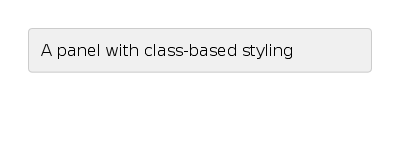
    .panel { background: #f0f0f0; border: 1px solid #ccc; padding: 12px; }
    .panel:hover { background: #e8e8e8; }
".into());

let _ = Dom::create_body()
    .with_child(Dom::create_div().with_class("panel".into()))
    .with_component_css(css);
Two ways to attach styles
There is one CSS model, and it works like the web's @scope:
every stylesheet is scoped to the subtree of the node it is attached to.
Dom::with_css(s)— the main entry point. The CSS string is parsed into aCssstruct and pushed onto that node's.cssvec. The cascade selector-matches it against the node's subtree during the single per-frame pass. A string with selectors (body { … } .btn { … }) matches elements in the subtree; a bare-declaration string (color: red) parses to* { color: red }, so it applies to the whole subtree — and on a leaf node (subtree length 1) that is exactly an „inline style.“ There is no separate node-only path: inline is a one-node@scope.Dom::with_css_property(p)— programmatic single-property override for when you already hold a typedCssPropertyand don't want to round-trip through string parsing. Highest priority short of!important.
use azul::prelude::*;

// 1. "Inline" — a bare-declaration string on a leaf node (subtree len 1)
let _ = Dom::create_div()
    .with_css("color: blue; padding: 4px; :hover { color: red; }");

// 2. A stylesheet scoped to a subtree — selectors match within it
let _ = Dom::create_body()
    .with_css(".btn { background: #1976d2; color: white; }")
    .with_child(
        Dom::create_button("Save", SmallAriaInfo::label("Save"))
            .with_class("btn".into())
    );
Note:
with_css(&str)parses a string;with_component_css(Css)takes a stylesheet you already parsed. Both are builder forms and both push onto the subtree's.cssvec, which the cascade reads;add_component_cssis the mutating twin for when you are not chaining.
Matching and inheritance happen once after layout() returns, in a single
cascade pass. The DOM page
walks through the timing.
For a static stylesheet shared across many nodes, build the Css once at
app startup and pass it through style(). Multiple style() calls stack.
A later one overrides earlier ones at equal specificity.
Selectors
The selector language matches W3C Selectors Level 3 minus a few rarely-used pseudo-classes:
- Universal:
*matches every node. - Type:
div,button,h1match nodes whose tag matches. - Class:
.panelmatches nodes withwith_class("panel"). - Id:
#sidebarmatches nodes withwith_id("sidebar"). - Attribute:
[lang],[lang="en"],[lang^="en"]test attribute presence and match. The operators are=,~=,|=,^=,$=,*=(seeAttributeMatchOp). - Descendant:
nav amatches an<a>anywhere under<nav>. - Child:
nav > amatches a direct<a>child of<nav>. - Adjacent sibling:
h2 + pmatches a<p>immediately after<h2>. - General sibling:
h2 ~ pmatches any<p>after<h2>at the same level. - Pseudo-class:
:hover,:focus,:nth-child(2n+1)are runtime-evaluated state.
Pseudo-classes
State pseudo-classes evaluate on every frame:
:hover: pointer is over the element.:active: pointer is pressed and over the element.:focus: element has keyboard focus.:first,:last: first or last child of its parent.:nth-child(n),:nth-child(2n+1),:nth-child(odd),:nth-child(even): positional.:lang(en): system locale matches the BCP 47 prefix.:backdrop: the containing window is unfocused. Use it for inactive-window styling.:dragging,:drag-over: drag-and-drop states.
These run without re-parsing the stylesheet.
At-rules
Conditional rule blocks. The condition is evaluated per frame, so changing the system theme or rotating a window adapts without re-cascading.
use azul::prelude::*;

let _ = Dom::create_div().with_css("
    color: black;
    @theme dark { color: white; }
    @os linux { font-family: 'Cantarell'; }
    @os windows { font-family: 'Segoe UI'; }
    @os macos { font-family: '.SF NS'; }
    @media (max-width: 600px) { font-size: 14px; }
");
@os <name>/@os(<name>)matches the host platform. Names:windows,macos,linux,android,ios,apple(macOS+iOS),web,any.@os(<family>:<de>)narrows to a Linux desktop environment. DEs:gnome,kde,xfce,unity,cinnamon,mate. Example:@os(linux:gnome) { ... }.@os(<family> <op> <version>)narrows to an OS version. Operators:>=,<=,=. Examples:@os(windows >= win-11),@os(macos = sonoma).@os(<family>:<de> <op> <version>)combines DE with a version. Example:@os(linux:gnome > 40).@theme <variant>matches the system theme. Variants:dark,light, plus any custom string.@media (orientation: ...)acceptsportraitorlandscape.@media (min-width: Npx)and friends match numeric viewport ranges.@media (prefers-reduced-motion)is the accessibility query for motion.@media (prefers-contrast)is the accessibility query for contrast.@containerenables container queries by width, height, or name.@lang(<bcp47>)matches the system language by prefix.
Conditions nest. An @os linux block can contain a :hover block, and
both conditions have to hold for the rule to apply.
See System Themes for how the system populates these values from OS settings.
The cascade and specificity
When more than one rule sets the same property, the cascade picks one. The rules, in order:
- Higher specificity wins.
- Equal specificity. The later rule wins.
style()calls stack. A laterstyle()is „later“ than an earlier one.with_css(inline) outranks any stylesheet for that node.
Specificity is the W3C tuple (ids, classes+pseudo+attrs, types, total).
Call Css::sort_by_specificity() once after parsing if you need
deterministic order. The parser doesn't sort by default. The framework
runs the sort during cascade.
Property values: the keyword set
Every typed property is wrapped in CssPropertyValue<T>:
pub enum CssPropertyValue<T> {
    Auto,
    None,
    Initial,
    Inherit,
    Revert,
    Unset,
    Exact(T),
}
Most properties accept the CSS-wide keywords. inherit walks to the parent's
resolved value. initial resets to the property's spec default. unset
behaves as inherit for inheritable properties and initial otherwise.
revert returns to the user-agent default. The parser preserves the
keyword and the cascade picks an explicit value at the latest moment.
Inheritable properties
Some properties propagate from parent to child by default; others don't. Inheritability is fixed by the property. The inheritable set follows CSS conventions:
- Text:
color,font-family,font-size,font-weight,line-height,text-align,letter-spacing,word-spacing. - Cursor:
cursor. - Visibility:
visibility. - Custom:
hyphenation-language.
Layout properties (width, padding, flex-grow, ...) and most visual
properties (background, border, ...) don't inherit. Write inherit
explicitly if you want one to.
Dynamic properties (var(...))
A dynamic declaration is a CSS value swappable from Rust per frame.
Syntax in CSS: var(--my_id, <default>). It compiles to
DynamicCssProperty:
pub struct DynamicCssProperty {
    pub dynamic_id: AzString,
    pub default_value: CssProperty,
}
Use them when you want to change a single value (an accent color, a
spacing unit) without re-parsing the stylesheet. The override path lives
on Dom::with_css_property.
system: keywords
Anywhere a colour or font is expected, system:<name> resolves at cascade
time against the running OS and theme:
use azul::prelude::*;

let _ = Dom::create_div().with_css("
    background: system:control;
    color: system:control-text;
    border: 1px solid system:separator;
    font-family: system:body;
    @theme dark { background: system:control; }
");
The lookup re-evaluates per frame, so a theme switch (light to dark)
updates without re-parsing the stylesheet. The available names
(system:control, system:accent, system:body, system:monospace,
...) are catalogued in System Themes. They compose
with @theme and @os the same way any other property would.
Parsing CSS
Css::from_string returns the parsed stylesheet:
use azul::prelude::*;

let css = Css::from_string("
    color: rebeccapurple;
".into());
The parser is feature-gated behind parser (always enabled in the
default build).
Where styles meet the DOM
The cascade runs once per layout pass, after your LayoutCallback returns.
Inputs, in priority order (low to high):
- The user-agent stylesheet sets HTML defaults (
h1font sizes,<button>padding,<a>color, ...). - Each
Cssattached to a subtree viaDom::style(...), instyle()push order. - Inline
with_cssrules on each node. - Programmatic
with_css_propertyoverrides (highest priority short of!important).
Internally the framework collects every CSS attachment from the recursive
Dom tree, merges the stylesheets in push order, and runs the cascade in
a single sweep. The output is a StyledDom: a flat, indexed view of the
cascaded properties. Subsequent frames only re-cascade the nodes whose
inputs actually changed.
The reason this matters even at the styling layer: every CSS string you
parse via with_css or Css::from_string is „free“ in the sense that it
is one parse and one push onto a list. Selector matching and inheritance
happen once after you return.
See The DOM for the per-frame walkthrough, and Layout for how the cascaded properties feed the formatting algorithms.
Sub-pages cover the catalogue of properties, the platform integration, and the icon and text-styling primitives:
- CSS Properties Cheatsheet. Every property and the values it accepts.
- System Themes.
system:*colors and fonts,@theme,@os, and accessibility queries. - Text and Fonts.
font-family, weight, style, alignment, plus thesystem:font keywords. - Icon Packs. Registering image and font icons under named packs.